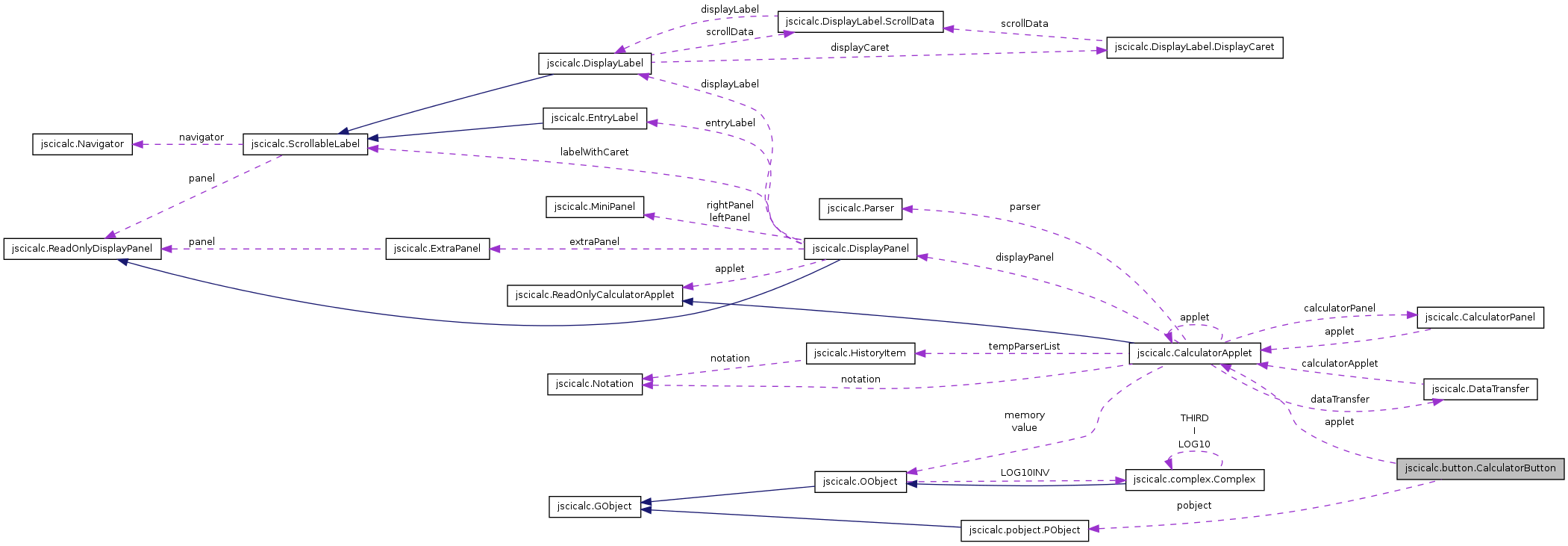
Each button on the calculator is an instance of this class. More...
Public Member Functions | |
| void | setPObject (PObject p) |
| If we didn’t set a PObject initially, we do so now. | |
| void | setToolTipText () |
| Set the text for the tooltip. | |
| CalculatorButton (CalculatorApplet applet) | |
| Another constructor. | |
| CalculatorButton (CalculatorApplet applet, PObject pobject) | |
| This is the constructor that we normally use. | |
| void | setText () |
| Set the text. | |
| void | setTextSize () |
| When a button is constructed it needs a fontsize consisten with all other buttons. | |
| void | setAngleType (AngleType angleType) |
| The PObject objects of class Trig need to know the AngleType currently in use by the CalculatorApplet. | |
| void | actionPerformed (java.awt.event.ActionEvent actionEvent) |
| This is the default actionPerformed. | |
| char | shortcut () |
| A shortcut key character. | |
| String | tooltip () |
| Get a copy of the tooltip. | |
Protected Member Functions | |
| CalculatorButton () | |
| A constructor with no arguments lets us derive subclasses without having to undo everything done here. | |
| void | setText (PObject p) |
| Set the text from a PObject. | |
| CalculatorApplet | getApplet () |
| Convenient for getting the controller object. | |
| void | add (PObject p) |
| Used internally when asking the applet to insert a PObject. | |
Protected Attributes | |
| CalculatorApplet | applet |
| The controller object. | |
| PObject | pobject |
| The PObject that defines the behaviour of this object. | |
| char | shortcut |
| The shortcut key (0 means no shortcut key). | |
| String | tooltip |
| The tooltip string. | |
Private Member Functions | |
| void | setup (CalculatorApplet applet, PObject pobject) |
| A setup function. | |
Static Private Attributes | |
| static final long | serialVersionUID = 1L |
Detailed Description
Each button on the calculator is an instance of this class.
Each button contains two important pieces of information. It knows about a PObject object. This object usually contains the information necessary for some calculator function such as plus, log or even a Numeral that needs to be stored in an expression. There are a few exceptions, such as the Mode and Shift buttons, where information needs to be sent to the CalculatorApplet object, but does not form part of an expression that the Parser object will evaluate. Generally, buttons that do more than create part of an expression use a subclass of this. The second piece of information that an object of this class needs is the CalculatorApplet object. Buttons don’t deal directly with the Parser object but rather request that the CalculatorApplet object do this for them.
Buttons are made available to the user through CalculatorPanel and its subclasses.
- See also:
- CalculatorApplet
- PObject
- Parser
- CalculatorPanel
- Version:
- Revision:
- 1.7
Constructor & Destructor Documentation
| jscicalc.button.CalculatorButton.CalculatorButton | ( | ) | [protected] |
A constructor with no arguments lets us derive subclasses without having to undo everything done here.
| jscicalc.button.CalculatorButton.CalculatorButton | ( | CalculatorApplet | applet | ) |
Another constructor.
This one is useful for subclasses and so could probably be protected. It’s also used to create empty buttons, though CalculatorPanel could be rewritten just to pass null as the PObject and call the standard constructor.
- Parameters:
-
applet The controller object
References jscicalc.button.CalculatorButton.setup().
| jscicalc.button.CalculatorButton.CalculatorButton | ( | CalculatorApplet | applet, | |
| PObject | pobject | |||
| ) |
This is the constructor that we normally use.
The remaining constructors should probably all be protected since they are designed to be used by subclasses.
- Parameters:
-
applet The controller object pobject The PObject object that tells the button how to look and behave
References jscicalc.button.CalculatorButton.setup().
Member Function Documentation
| void jscicalc.button.CalculatorButton.actionPerformed | ( | java.awt.event.ActionEvent | actionEvent | ) |
This is the default actionPerformed.
It checks that the calculator is switched on and then carries out the action associated with this button depending on the state of the CalculatorApplet object. Typically it just asks the CalculatorApplet object to add its PObject to the Parser object at the current insert position and then update the display.
- Parameters:
-
actionEvent The event that generated this method call: usually a button press or called when CalculatorApplet responded to the key associated with this button
Reimplemented in jscicalc.button.AnsButton, jscicalc.button.CopyButton, jscicalc.button.CplxButton, jscicalc.button.DelButton, jscicalc.button.DownButton, jscicalc.button.EqualsButton, jscicalc.button.GraphButton, jscicalc.button.InfoButton, jscicalc.button.LeftButton, jscicalc.button.MclButton, jscicalc.button.MminusButton, jscicalc.button.ModeButton, jscicalc.button.MplusButton, jscicalc.button.OffButton, jscicalc.button.OnButton, jscicalc.button.OrigButton, jscicalc.button.PolButton, jscicalc.button.RCLButton, jscicalc.button.RightButton, jscicalc.button.SciButton, jscicalc.button.SclButton, jscicalc.button.ShiftButton, jscicalc.button.SminusButton, jscicalc.button.SplusButton, jscicalc.button.STOButton, and jscicalc.button.UpButton.
References jscicalc.button.CalculatorButton.add(), jscicalc.button.CalculatorButton.applet, jscicalc.CalculatorApplet.getAngleType(), jscicalc.button.CalculatorButton.getApplet(), jscicalc.CalculatorApplet.getMode(), jscicalc.button.CalculatorButton.pobject, jscicalc.button.CalculatorButton.setAngleType(), jscicalc.CalculatorApplet.setMode(), jscicalc.CalculatorApplet.setShift(), jscicalc.pobject.PObject.shortcut(), and jscicalc.CalculatorApplet.updateDisplay().
Referenced by jscicalc.CalculatorApplet.keyTyped().
| void jscicalc.button.CalculatorButton.add | ( | PObject | p | ) | [protected] |
Used internally when asking the applet to insert a PObject.
In some cases we want to add an extra Ans object and this method handles this case.
- Parameters:
-
p The PObject: since it should always be this.pobject the parameter should probably be removed
References jscicalc.button.CalculatorButton.getApplet(), jscicalc.CalculatorApplet.getValue(), jscicalc.CalculatorApplet.insert(), jscicalc.pobject.Ans.setValue(), and jscicalc.CalculatorApplet.updateDisplay().
Referenced by jscicalc.button.RCLButton.actionPerformed(), jscicalc.button.CalculatorButton.actionPerformed(), and jscicalc.button.AnsButton.actionPerformed().
| CalculatorApplet jscicalc.button.CalculatorButton.getApplet | ( | ) | [protected] |
Convenient for getting the controller object.
References jscicalc.button.CalculatorButton.applet.
Referenced by jscicalc.button.UpButton.actionPerformed(), jscicalc.button.STOButton.actionPerformed(), jscicalc.button.SplusButton.actionPerformed(), jscicalc.button.SminusButton.actionPerformed(), jscicalc.button.ShiftButton.actionPerformed(), jscicalc.button.SclButton.actionPerformed(), jscicalc.button.SciButton.actionPerformed(), jscicalc.button.RightButton.actionPerformed(), jscicalc.button.RCLButton.actionPerformed(), jscicalc.button.PolButton.actionPerformed(), jscicalc.button.OrigButton.actionPerformed(), jscicalc.button.OnButton.actionPerformed(), jscicalc.button.OffButton.actionPerformed(), jscicalc.button.MplusButton.actionPerformed(), jscicalc.button.ModeButton.actionPerformed(), jscicalc.button.MminusButton.actionPerformed(), jscicalc.button.MclButton.actionPerformed(), jscicalc.button.LeftButton.actionPerformed(), jscicalc.button.InfoButton.actionPerformed(), jscicalc.button.GraphButton.actionPerformed(), jscicalc.button.EqualsButton.actionPerformed(), jscicalc.button.DownButton.actionPerformed(), jscicalc.button.DelButton.actionPerformed(), jscicalc.button.CplxButton.actionPerformed(), jscicalc.button.CopyButton.actionPerformed(), jscicalc.button.CalculatorButton.actionPerformed(), jscicalc.button.AnsButton.actionPerformed(), jscicalc.button.CalculatorButton.add(), jscicalc.button.EqualsButton.setBase(), and jscicalc.button.CalculatorButton.setTextSize().
| void jscicalc.button.CalculatorButton.setAngleType | ( | AngleType | angleType | ) |
The PObject objects of class Trig need to know the AngleType currently in use by the CalculatorApplet.
This method allows us to set the value. Probably it should not have a parameter but ask the CalculatorApplet for a value.
- Parameters:
-
angleType AngleType.DEGREES or AngleType.RADIANS
References jscicalc.button.CalculatorButton.pobject.
Referenced by jscicalc.button.CalculatorButton.actionPerformed().
| void jscicalc.button.CalculatorButton.setPObject | ( | PObject | p | ) |
If we didn’t set a PObject initially, we do so now.
- Parameters:
-
p The PObject object that tells the button how to look and behave
References jscicalc.button.CalculatorButton.pobject, jscicalc.button.CalculatorButton.setText(), jscicalc.button.CalculatorButton.setToolTipText(), jscicalc.pobject.PObject.shortcut(), jscicalc.button.CalculatorButton.shortcut(), jscicalc.pobject.PObject.tooltip(), and jscicalc.button.CalculatorButton.tooltip().
Referenced by jscicalc.button.CalculatorButton.setup().
| void jscicalc.button.CalculatorButton.setText | ( | ) |
Set the text.
Again we use the PObject.
References jscicalc.button.CalculatorButton.pobject.
Referenced by jscicalc.button.AnsButton.AnsButton(), jscicalc.button.BinButton.BinButton(), jscicalc.button.CopyButton.CopyButton(), jscicalc.button.CplxButton.CplxButton(), jscicalc.button.DecButton.DecButton(), jscicalc.button.DelButton.DelButton(), jscicalc.button.EqualsButton.EqualsButton(), jscicalc.button.GraphButton.GraphButton(), jscicalc.button.HexButton.HexButton(), jscicalc.button.MclButton.MclButton(), jscicalc.button.MminusButton.MminusButton(), jscicalc.button.ModeButton.ModeButton(), jscicalc.button.MplusButton.MplusButton(), jscicalc.button.OctButton.OctButton(), jscicalc.button.OffButton.OffButton(), jscicalc.button.OnButton.OnButton(), jscicalc.button.OrigButton.OrigButton(), jscicalc.button.PolButton.PolButton(), jscicalc.button.RCLButton.RCLButton(), jscicalc.button.SciButton.SciButton(), jscicalc.button.SclButton.SclButton(), jscicalc.button.CalculatorButton.setPObject(), jscicalc.button.CalculatorButton.setText(), jscicalc.button.CalculatorButton.setup(), jscicalc.button.ShiftButton.ShiftButton(), jscicalc.button.SminusButton.SminusButton(), jscicalc.button.SplusButton.SplusButton(), and jscicalc.button.STOButton.STOButton().
| void jscicalc.button.CalculatorButton.setText | ( | PObject | p | ) | [protected] |
Set the text from a PObject.
This allows us to override the PObject in this class, though I don’t think we ever do. It uses PObject.shortName() to create some text that appears on the button and then wraps in in HTML tags. This is useful so that, for example, the squared button has the 2 in the position.
- Parameters:
-
p A PObject: usually this.pobject.
References jscicalc.button.CalculatorButton.setText(), and jscicalc.pobject.PObject.shortName().
| void jscicalc.button.CalculatorButton.setTextSize | ( | ) |
When a button is constructed it needs a fontsize consisten with all other buttons.
This method gets the correct font from the controller CalculatorApplet object.
References jscicalc.button.CalculatorButton.getApplet().
Referenced by jscicalc.button.AnsButton.AnsButton(), jscicalc.button.BinButton.BinButton(), jscicalc.button.CopyButton.CopyButton(), jscicalc.button.CplxButton.CplxButton(), jscicalc.button.DecButton.DecButton(), jscicalc.button.DelButton.DelButton(), jscicalc.button.EqualsButton.EqualsButton(), jscicalc.button.GraphButton.GraphButton(), jscicalc.button.HexButton.HexButton(), jscicalc.button.MclButton.MclButton(), jscicalc.button.MminusButton.MminusButton(), jscicalc.button.ModeButton.ModeButton(), jscicalc.button.MplusButton.MplusButton(), jscicalc.button.OctButton.OctButton(), jscicalc.button.OffButton.OffButton(), jscicalc.button.OnButton.OnButton(), jscicalc.button.OrigButton.OrigButton(), jscicalc.button.PolButton.PolButton(), jscicalc.button.RCLButton.RCLButton(), jscicalc.button.SciButton.SciButton(), jscicalc.button.SclButton.SclButton(), jscicalc.button.CalculatorButton.setup(), jscicalc.button.ShiftButton.ShiftButton(), jscicalc.button.SminusButton.SminusButton(), jscicalc.button.SplusButton.SplusButton(), and jscicalc.button.STOButton.STOButton().
| void jscicalc.button.CalculatorButton.setToolTipText | ( | ) |
Set the text for the tooltip.
This is extracted from the PObject byt taking the PObject.tooltip() function, adding the PObject.shortcut key in square brackets and wrapping everything in HTML.
- See also:
- PObject
References jscicalc.button.CalculatorButton.shortcut(), and jscicalc.button.CalculatorButton.tooltip().
Referenced by jscicalc.button.AnsButton.AnsButton(), jscicalc.button.BinButton.BinButton(), jscicalc.button.CopyButton.CopyButton(), jscicalc.button.CplxButton.CplxButton(), jscicalc.button.DecButton.DecButton(), jscicalc.button.DelButton.DelButton(), jscicalc.button.DownButton.DownButton(), jscicalc.button.EqualsButton.EqualsButton(), jscicalc.button.GraphButton.GraphButton(), jscicalc.button.HexButton.HexButton(), jscicalc.button.InfoButton.InfoButton(), jscicalc.button.LeftButton.LeftButton(), jscicalc.button.MclButton.MclButton(), jscicalc.button.MminusButton.MminusButton(), jscicalc.button.ModeButton.ModeButton(), jscicalc.button.MplusButton.MplusButton(), jscicalc.button.OctButton.OctButton(), jscicalc.button.OffButton.OffButton(), jscicalc.button.OnButton.OnButton(), jscicalc.button.OrigButton.OrigButton(), jscicalc.button.PolButton.PolButton(), jscicalc.button.RCLButton.RCLButton(), jscicalc.button.RightButton.RightButton(), jscicalc.button.SciButton.SciButton(), jscicalc.button.SclButton.SclButton(), jscicalc.button.CalculatorButton.setPObject(), jscicalc.button.ShiftButton.ShiftButton(), jscicalc.button.SminusButton.SminusButton(), jscicalc.button.SplusButton.SplusButton(), jscicalc.button.STOButton.STOButton(), and jscicalc.button.UpButton.UpButton().
| void jscicalc.button.CalculatorButton.setup | ( | CalculatorApplet | applet, | |
| PObject | pobject | |||
| ) | [private] |
A setup function.
It might be better to make it protected and call it from the subclass so that we can add ActionListener objects without reimplementing this code.
- Parameters:
-
applet The controller object pobject The PObject object that tells the button how to look and behave
References jscicalc.button.CalculatorButton.setPObject(), jscicalc.button.CalculatorButton.setText(), and jscicalc.button.CalculatorButton.setTextSize().
Referenced by jscicalc.button.CalculatorButton.CalculatorButton().
A shortcut key character.
- Returns:
- a character representing a shortcut key
References jscicalc.button.CalculatorButton.shortcut.
Referenced by jscicalc.button.AnsButton.AnsButton(), jscicalc.button.BinButton.BinButton(), jscicalc.button.CopyButton.CopyButton(), jscicalc.button.CplxButton.CplxButton(), jscicalc.button.DecButton.DecButton(), jscicalc.button.DelButton.DelButton(), jscicalc.button.EqualsButton.EqualsButton(), jscicalc.button.GraphButton.GraphButton(), jscicalc.button.HexButton.HexButton(), jscicalc.button.InfoButton.InfoButton(), jscicalc.button.MclButton.MclButton(), jscicalc.button.MminusButton.MminusButton(), jscicalc.button.ModeButton.ModeButton(), jscicalc.button.MplusButton.MplusButton(), jscicalc.button.OctButton.OctButton(), jscicalc.button.OffButton.OffButton(), jscicalc.button.OnButton.OnButton(), jscicalc.button.OrigButton.OrigButton(), jscicalc.button.PolButton.PolButton(), jscicalc.button.RCLButton.RCLButton(), jscicalc.button.SciButton.SciButton(), jscicalc.button.SclButton.SclButton(), jscicalc.button.CalculatorButton.setPObject(), jscicalc.button.CalculatorButton.setToolTipText(), jscicalc.button.ShiftButton.ShiftButton(), jscicalc.button.SminusButton.SminusButton(), jscicalc.button.SplusButton.SplusButton(), and jscicalc.button.STOButton.STOButton().
| String jscicalc.button.CalculatorButton.tooltip | ( | ) |
Get a copy of the tooltip.
I can’t remember if we use this.
- Returns:
- A copy of the tooltip
Referenced by jscicalc.button.AnsButton.AnsButton(), jscicalc.button.BinButton.BinButton(), jscicalc.button.CopyButton.CopyButton(), jscicalc.button.CplxButton.CplxButton(), jscicalc.button.DecButton.DecButton(), jscicalc.button.DelButton.DelButton(), jscicalc.button.DownButton.DownButton(), jscicalc.button.EqualsButton.EqualsButton(), jscicalc.button.GraphButton.GraphButton(), jscicalc.button.HexButton.HexButton(), jscicalc.button.InfoButton.InfoButton(), jscicalc.button.LeftButton.LeftButton(), jscicalc.button.MclButton.MclButton(), jscicalc.button.MminusButton.MminusButton(), jscicalc.button.ModeButton.ModeButton(), jscicalc.button.MplusButton.MplusButton(), jscicalc.button.OctButton.OctButton(), jscicalc.button.OffButton.OffButton(), jscicalc.button.OnButton.OnButton(), jscicalc.button.OrigButton.OrigButton(), jscicalc.button.PolButton.PolButton(), jscicalc.button.RCLButton.RCLButton(), jscicalc.button.RightButton.RightButton(), jscicalc.button.SciButton.SciButton(), jscicalc.button.SclButton.SclButton(), jscicalc.button.CalculatorButton.setPObject(), jscicalc.button.CalculatorButton.setToolTipText(), jscicalc.button.ShiftButton.ShiftButton(), jscicalc.button.SminusButton.SminusButton(), jscicalc.button.SplusButton.SplusButton(), jscicalc.button.STOButton.STOButton(), and jscicalc.button.UpButton.UpButton().
Member Data Documentation
The controller object.
Referenced by jscicalc.button.STOButton.actionPerformed(), jscicalc.button.SplusButton.actionPerformed(), jscicalc.button.SminusButton.actionPerformed(), jscicalc.button.ShiftButton.actionPerformed(), jscicalc.button.SclButton.actionPerformed(), jscicalc.button.SciButton.actionPerformed(), jscicalc.button.RCLButton.actionPerformed(), jscicalc.button.PolButton.actionPerformed(), jscicalc.button.OrigButton.actionPerformed(), jscicalc.button.OnButton.actionPerformed(), jscicalc.button.OffButton.actionPerformed(), jscicalc.button.MplusButton.actionPerformed(), jscicalc.button.ModeButton.actionPerformed(), jscicalc.button.MminusButton.actionPerformed(), jscicalc.button.MclButton.actionPerformed(), jscicalc.button.InfoButton.actionPerformed(), jscicalc.button.GraphButton.actionPerformed(), jscicalc.button.EqualsButton.actionPerformed(), jscicalc.button.DelButton.actionPerformed(), jscicalc.button.CplxButton.actionPerformed(), jscicalc.button.CopyButton.actionPerformed(), jscicalc.button.CalculatorButton.actionPerformed(), jscicalc.button.AnsButton.actionPerformed(), and jscicalc.button.CalculatorButton.getApplet().
PObject jscicalc.button.CalculatorButton.pobject [protected] |
The PObject that defines the behaviour of this object.
Referenced by jscicalc.button.STOButton.actionPerformed(), jscicalc.button.SplusButton.actionPerformed(), jscicalc.button.SminusButton.actionPerformed(), jscicalc.button.ShiftButton.actionPerformed(), jscicalc.button.SciButton.actionPerformed(), jscicalc.button.RCLButton.actionPerformed(), jscicalc.button.PolButton.actionPerformed(), jscicalc.button.OrigButton.actionPerformed(), jscicalc.button.MplusButton.actionPerformed(), jscicalc.button.MminusButton.actionPerformed(), jscicalc.button.EqualsButton.actionPerformed(), jscicalc.button.DelButton.actionPerformed(), jscicalc.button.CplxButton.actionPerformed(), jscicalc.button.CopyButton.actionPerformed(), jscicalc.button.CalculatorButton.actionPerformed(), jscicalc.button.AnsButton.actionPerformed(), jscicalc.button.AnsButton.AnsButton(), jscicalc.button.BinButton.BinButton(), jscicalc.button.CopyButton.CopyButton(), jscicalc.button.CplxButton.CplxButton(), jscicalc.button.DecButton.DecButton(), jscicalc.button.DelButton.DelButton(), jscicalc.button.DownButton.DownButton(), jscicalc.button.EqualsButton.EqualsButton(), jscicalc.button.GraphButton.GraphButton(), jscicalc.button.HexButton.HexButton(), jscicalc.button.InfoButton.InfoButton(), jscicalc.button.LeftButton.LeftButton(), jscicalc.button.MclButton.MclButton(), jscicalc.button.MminusButton.MminusButton(), jscicalc.button.ModeButton.ModeButton(), jscicalc.button.MplusButton.MplusButton(), jscicalc.button.OctButton.OctButton(), jscicalc.button.OffButton.OffButton(), jscicalc.button.OnButton.OnButton(), jscicalc.button.OrigButton.OrigButton(), jscicalc.button.PolButton.PolButton(), jscicalc.button.RCLButton.RCLButton(), jscicalc.button.RightButton.RightButton(), jscicalc.button.SciButton.SciButton(), jscicalc.button.SclButton.SclButton(), jscicalc.button.CalculatorButton.setAngleType(), jscicalc.button.CalculatorButton.setPObject(), jscicalc.button.CalculatorButton.setText(), jscicalc.button.ShiftButton.ShiftButton(), jscicalc.button.SminusButton.SminusButton(), jscicalc.button.SplusButton.SplusButton(), jscicalc.button.STOButton.STOButton(), and jscicalc.button.UpButton.UpButton().
final long jscicalc.button.CalculatorButton.serialVersionUID = 1L [static, private] |
Reimplemented in jscicalc.button.AnsButton, jscicalc.button.BinButton, jscicalc.button.CopyButton, jscicalc.button.CplxButton, jscicalc.button.DecButton, jscicalc.button.DelButton, jscicalc.button.DownButton, jscicalc.button.EqualsButton, jscicalc.button.GraphButton, jscicalc.button.HexButton, jscicalc.button.InfoButton, jscicalc.button.LeftButton, jscicalc.button.MclButton, jscicalc.button.MminusButton, jscicalc.button.ModeButton, jscicalc.button.MplusButton, jscicalc.button.OctButton, jscicalc.button.OffButton, jscicalc.button.OnButton, jscicalc.button.OrigButton, jscicalc.button.PolButton, jscicalc.button.RCLButton, jscicalc.button.RightButton, jscicalc.button.SciButton, jscicalc.button.SclButton, jscicalc.button.ShiftButton, jscicalc.button.SminusButton, jscicalc.button.SplusButton, jscicalc.button.STOButton, and jscicalc.button.UpButton.
char jscicalc.button.CalculatorButton.shortcut [protected] |
The shortcut key (0 means no shortcut key).
Referenced by jscicalc.button.CalculatorButton.shortcut().
String jscicalc.button.CalculatorButton.tooltip [protected] |
The tooltip string.
The documentation for this class was generated from the following file:
